
How to license your script
Find your license key under License keys in your Frozen Scripts account, set your server IP, and add the key to cred.lua so your script starts.
On this page
Some of our scripts are IP-locked: they only start on a server whose IP address is saved on your license key. This guide shows where to find your key, how to set your server IP, and where to put the key in the script.
Step 1 - Open your License keys page
Sign in on frozen-scripts.com with the account you bought the script with (Discord or email). Then open Account → License keys, or go straight to frozen-scripts.com/account/licenses. You can also find License keys in the footer of every page.
Step 2 - Find your license key
Every IP-locked script you buy gets its license key automatically, straight after payment. Each key is shown under the product's name and starts with FS-.
- Press Show to see the key, and Copy to copy it.
- If a product is listed under Ready to create, you own it but it has no key yet (this can happen with older purchases). Press Create key. You can type your server IP in the box next to it at the same time.
Step 3 - Set your server IP
Enter your server's public IP address under Allowed server IP and press Save. If an IP is already saved, press Change first.
- You can paste the IP with or without the port:
51.75.10.20and51.75.10.20:30120both work. - Until an IP is saved, the script won't start on any server.
- Each key works on one server IP. When you move to a new server, change the IP and press Save again.

The message in the console still mentions license.frozen-scripts.com. That address now opens your License keys page.
Step 4 - Add the key to the script
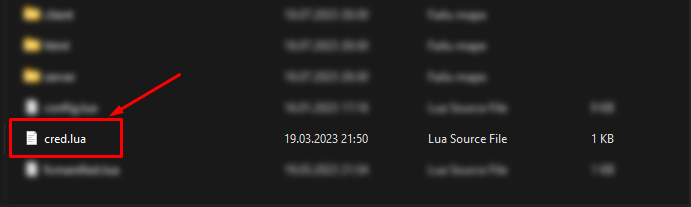
Open the script's folder and find the cred.lua file.
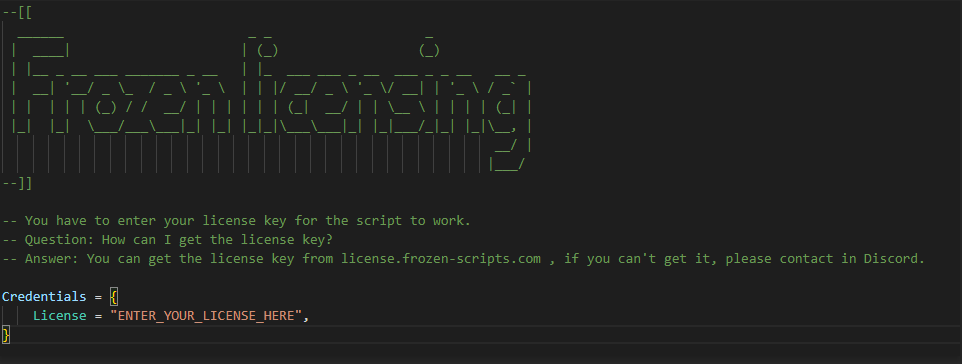
Replace ENTER_YOUR_LICENSE_HERE with your license key, keeping the quotes.
Step 5 - Restart and check
Restart your server, or run ensure resource-name in the server console. The script checks its license when it starts.
To see if it worked, look at the key on the License keys page: it shows when it was last checked, and under Recent checks each start is listed as Allowed or as the reason it was refused.
FAQ
The console says "You don't have access to the script!"
The IP saved on your key doesn't match the server. Copy the IP from that console message, save it on the License keys page, and restart the resource.
Someone else has my license key
Press New key on the License keys page. The old key stops working right away, so put the new key in cred.lua and restart your server.
What do Switch off and "Blocked by staff" mean?
Switch off pauses a key until you press Switch on again. If a key shows Blocked by staff, contact us on Discord.
I need the script on more than one server
A key works on one server IP. If you need it on another server, for example a test server, ask us on Discord.
Still stuck?Ask on our Discord