FiveM Tree Generator | Add Forests In Game
Draw zones in game and fill them with trees, no map files needed. Players can hug and chop the trees. For ESX.
One-time payment · tax included · instant download
- Instant downloadFiles unlock the moment payment confirms.
- No license key neededPlug & play with no IP lock or encryption — fully editable.
- Open Source
- Yes
- Framework
- ESX
- Instant digital delivery
- 256-bit SSL checkout
- Lifetime file updates
- Discord tech support
What you get
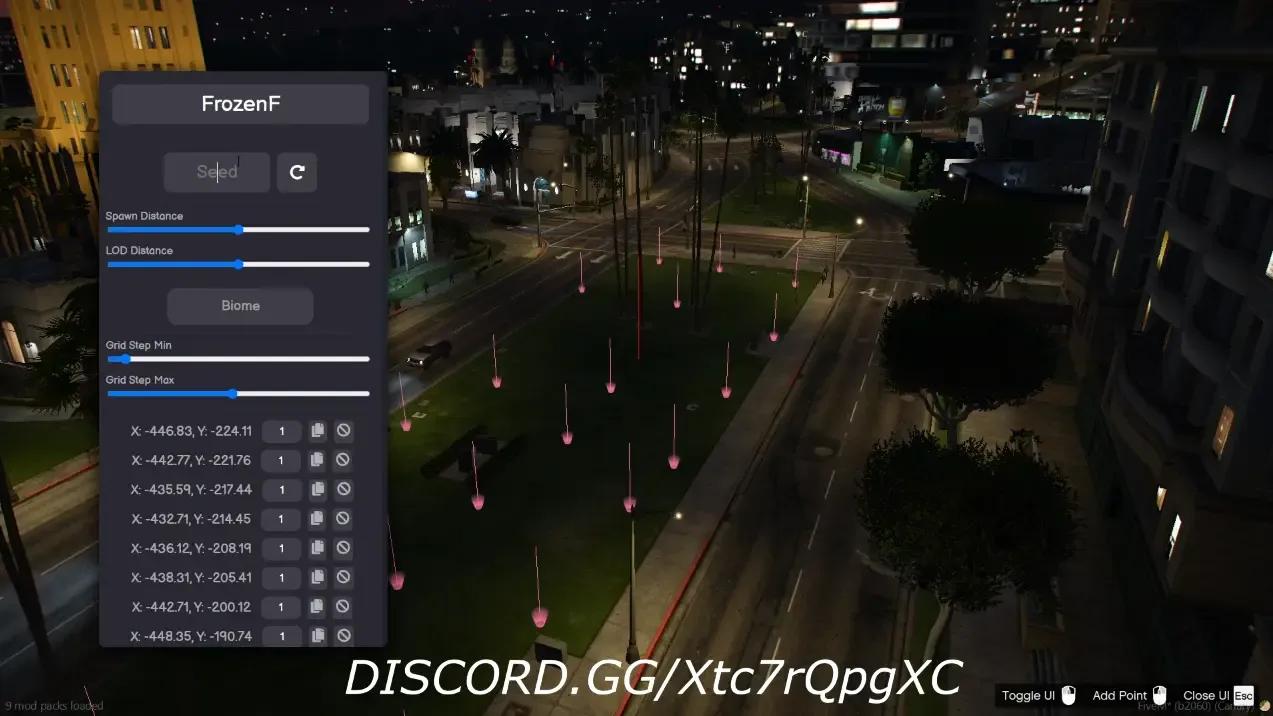
Add trees to your server without map add-ons. Draw a zone with the in-game UI, tweak it, preview it and save. After a restart, the zone generates the same way for every player.
Features
| Generation | Procedural, with lots of settings |
| Editor | In-game UI to draw, tweak and preview zones |
| Biomes | Forest biome included |
| Trees | Players can hug them or chop them down |
| Exports | Read and add a player’s carried log count |
| Job | Not included |
Dependencies
- PolyZone
- meta_libs
- fivem-target (optional, for tree interactions)
Good to know
- GTA allows about 3,000 spawned objects. You get a warning in game if a zone goes over.
- Very large zones load slowly; use the group tool in the UI to split them.
- Built for adding forests to areas, not for filling the whole map.
- Some coding knowledge helps you get the most out of it.
- No support is included at this price.
More ESX scripts.
Up and running in minutes
- 1Install PolyZone and meta_libs (and fivem-target for tree interactions), and start them first.
- 2Drop the script folder into your resources folder and add an ensure line to server.cfg.
- 3Restart, open the in-game UI, draw a zone, preview it and save.
Framework compatibility
- ESX Legacy
Customer reviews
No reviews yet. Customers who own this product can write the first one.
Every customer who reviews a product they own gets a 20% discount code as a thank-you, whatever rating they give.
Customer reviews will show up here.
Frequently asked questions
When will I get my order?
Instantly. As soon as your payment is confirmed, the files appear in your Downloads, together with every future update.
Which frameworks does it support?
Each script lists its frameworks on the product page (ESX, QBCore, Qbox or standalone).
Do I need a license key?
Scripts marked “License key included” are tied to your server’s IP. You can change the IP yourself any time on your License keys page.
Are updates included?
Yes. Every purchase includes all future updates, downloadable from your account.
What if it doesn’t work?
Ask us on Discord and we’ll help you fix it. If a resource doesn’t work as described and we can’t fix it, you get a refund, as set out in our refund policy.
What if I need help?
Open a ticket in our Discord and the team will help you get it running.